

Step-by-step guide
What is programming? Instructions in the right order, and the difference between a bug and a crash
Short answer: programming is the process of converting ideas into instructions that a computer can understand and execute, and those instructions must run in the right order. A bug is a flaw that makes a program give a wrong or unexpected result; a crash is when the program stops working completely and closes or restarts.
This is the first class of my programming foundation course (Python, 2021). In this guide you will go step by step from a simple everyday example (taking a picture with your phone) to a small calculator program, first as a whiteboard flowchart and then in real Python code. You will see what happens when the sequence of the code is wrong, how to recognize a bug vs a crash, how bugs get reported and fixed in the next update, and why errors are normal when you learn to code. At the end there is a comparison table, a troubleshooting table and an FAQ.
In this article
- Understand what programming is
- Turn an idea into a list of instructions
- Put the steps in the right order
- Draw the program as a flowchart first
- Store the first number in a variable
- Choose the operation, the second number and the result
- Write the calculator in Python
- See what happens when the order is wrong
- Recognize a bug
- Report the bug so it can be fixed
- Recognize a crash
- Expect errors, and find them early
- Bug vs crash vs error: comparison table
- Where does the word "bug" come from?
- Common causes of bugs for beginners
- What to do when your program crashes or has a bug
- Tips to write code with fewer bugs
- Frequently asked questions
- Watch the video
Step 1Understand what programming is
- Everything you do with your phone, your computer or even a microwave works because someone programmed it to behave in a certain way.
- You unlock your phone and see the time, check Facebook or WhatsApp, or make a phone call: each of those is a program following instructions.
- Programming is the process of converting ideas into instructions that the computer can understand and execute.
- Tip: go through the lessons of a course in order, one by one; each class builds on the previous one.
Step 2Turn an idea into a list of instructions
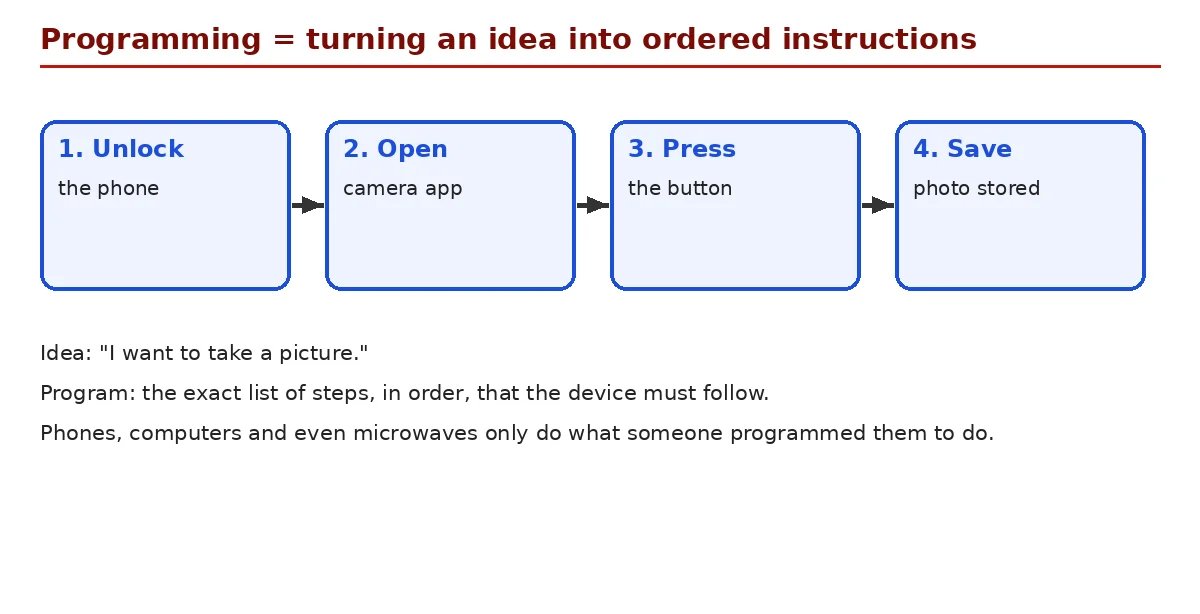
- Example from the video: you want to take a picture. That is the idea.
- The instructions are: unlock the phone, open the camera software, press the button, and the picture is stored on the phone.
- A program is exactly that: a precise list of small steps. The computer does not guess what you mean; it only does what the steps say.
Step 3Put the steps in the right order
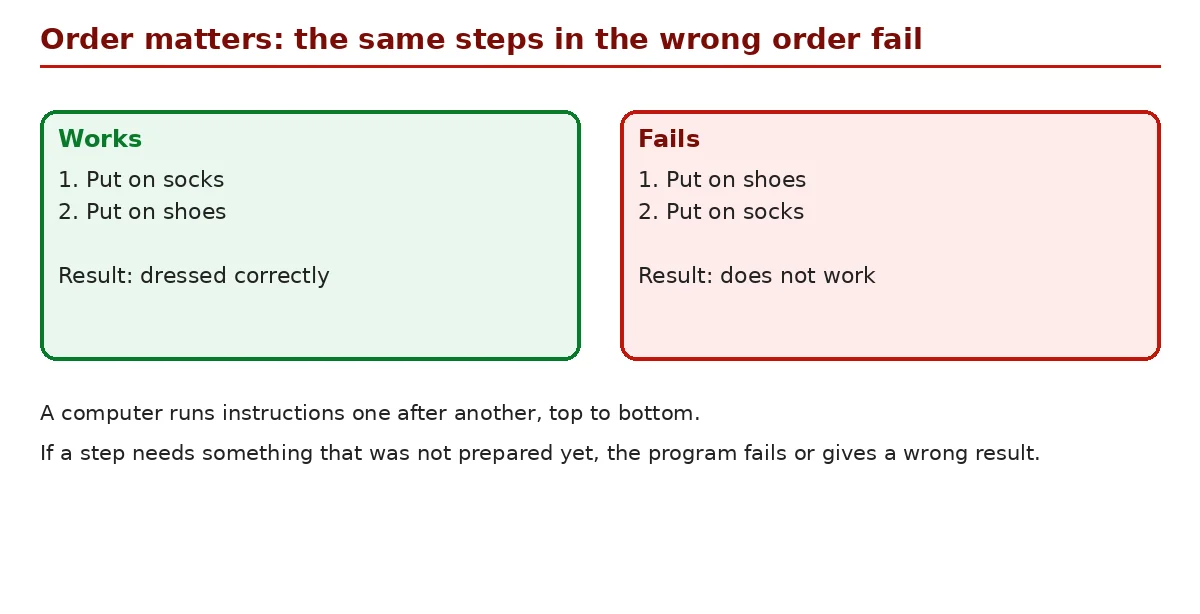
- The sequence of the code is very important. You cannot do things backwards or in any other order.
- Same as getting dressed: you put on your socks first and then your tennis shoes. Shoes first, then socks, and things do not work out.
- For the camera: if you press the button before opening the camera app, nothing gets captured.
- Common mistake for beginners: writing all the right lines, but in the wrong order.
Step 4Draw the program as a flowchart first
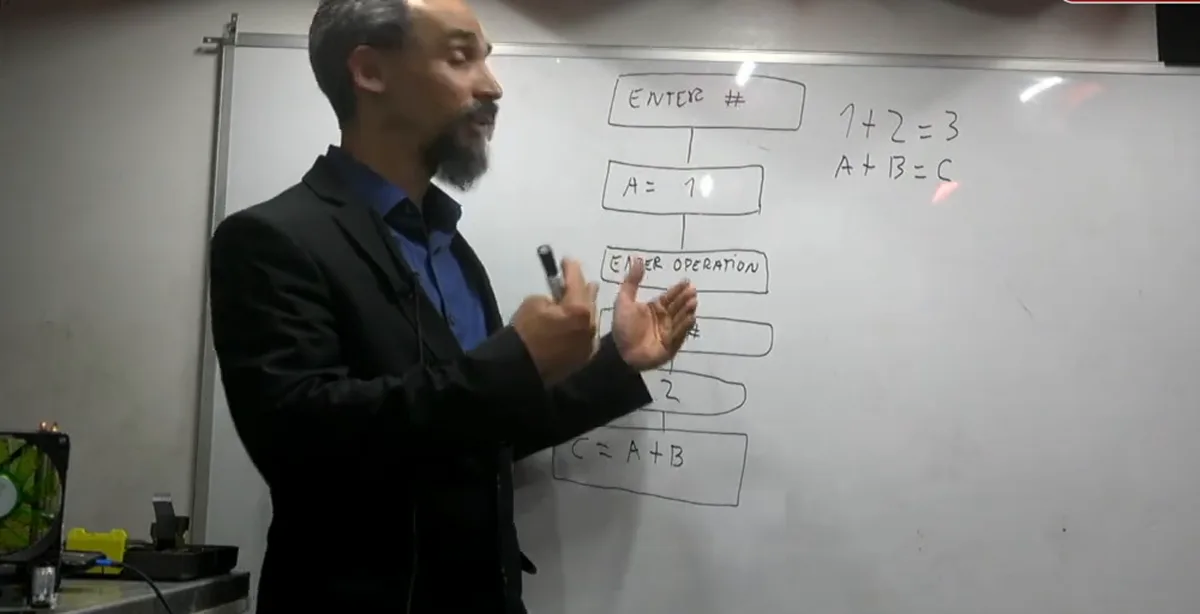
- Before coding, it helps to draw the steps as boxes connected by arrows. That is a flowchart.
- The example in the class is a small calculator: enter a number, enter an operation, enter another number, get the result.
- A flowchart shows the order at a glance, so you spot missing or swapped steps before writing a single line of code.
Step 5Store the first number in a variable
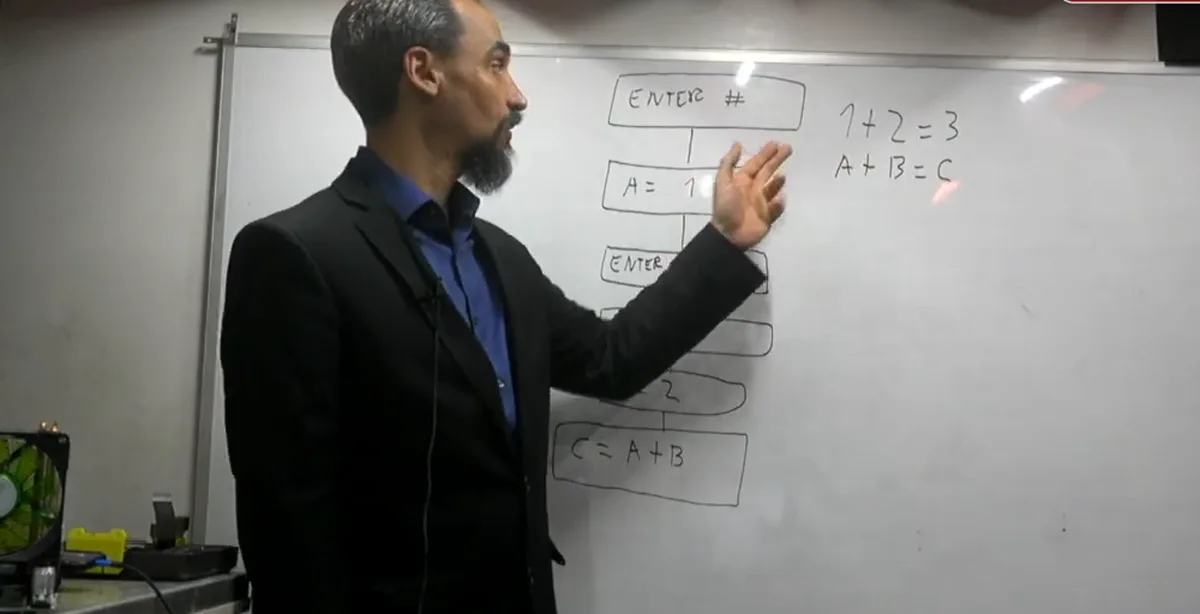
- Step one of the program: enter a number. You can enter any number, and it is saved in a.
- a is a variable: a name that stores a value so the program can use it later.
- In the example the user types 1, so a = 1.
Step 6Choose the operation, the second number and the result
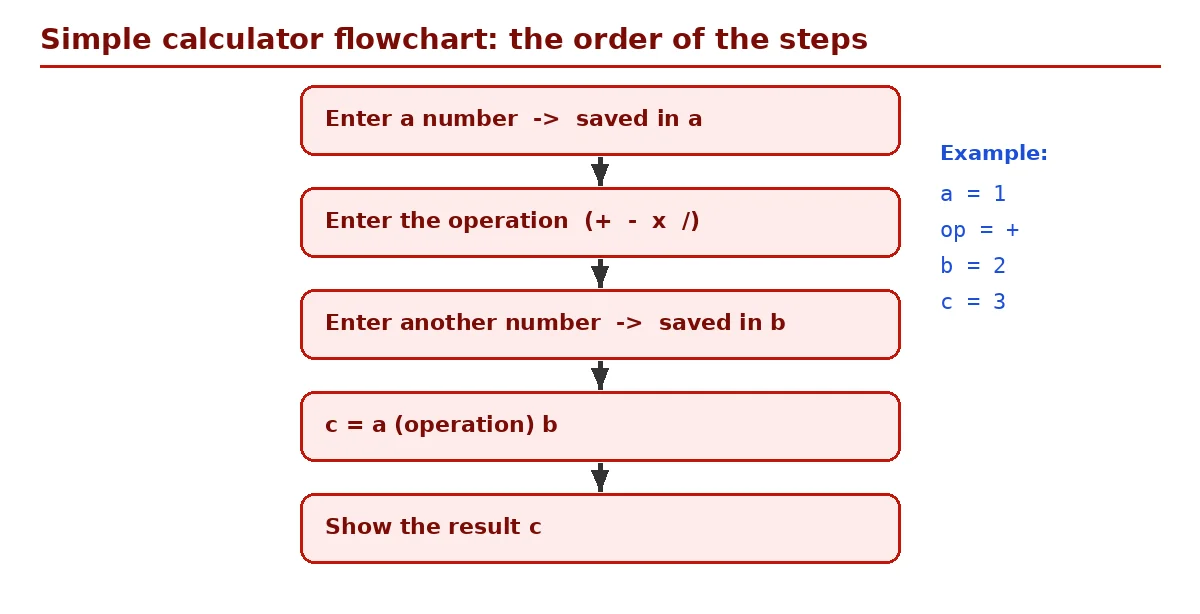
- Next you enter the operation: it could be plus, minus, multiply or divide.
- Then you enter another number, which is saved in b (in the example, 2).
- Finally the program computes the result: a + b = c, so 1 + 2 = 3.
- Every box depends on the boxes above it: the result can only be calculated after a, the operation and b exist.
Step 7Write the calculator in Python
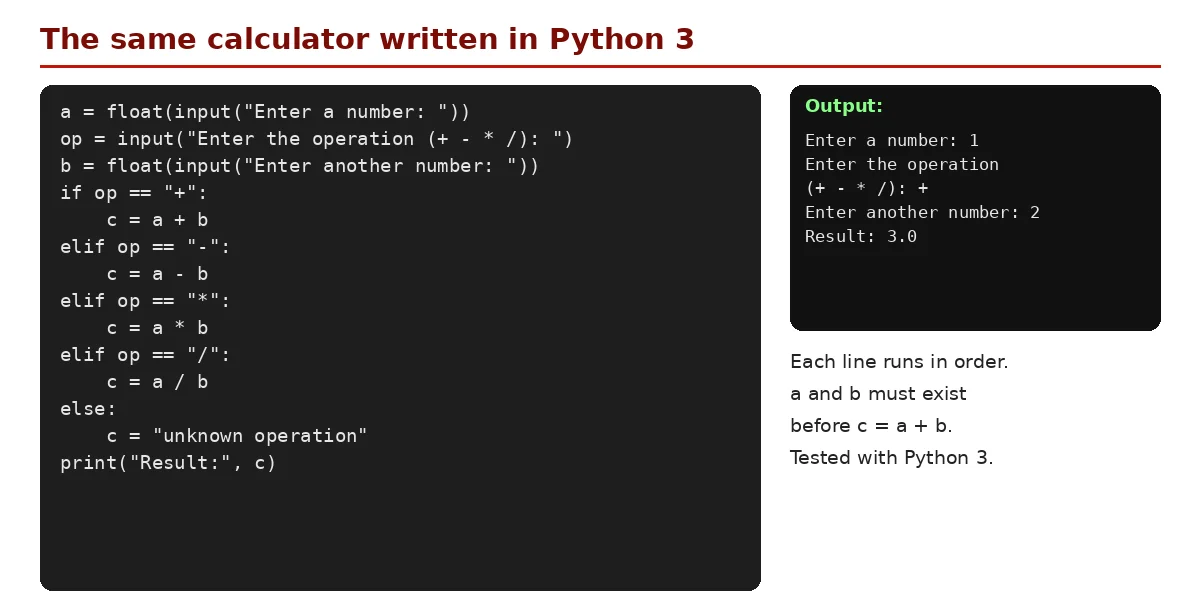
- This is the same flowchart written in Python 3 (my example, tested with Python 3). Each line runs from top to bottom.
input()asks the user to type something;float()turns the text into a number;if/elifchoose the operation.- With the inputs 1, + and 2 the program prints
Result: 3.0. - New to Python? See how to run a Python file from the command line.
Step 8See what happens when the order is wrong
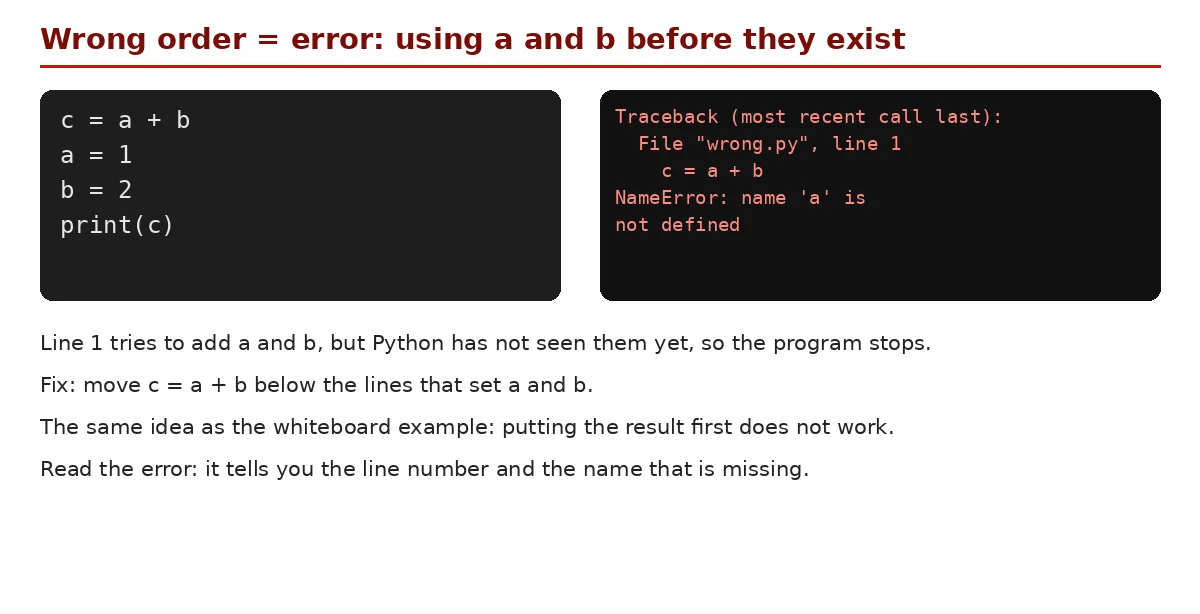
- In the class, if you put the multiplier first, or use a letter where a number should be (1 + b = what?), or put the result first, you get an error.
- In Python, putting
c = a + bbeforea = 1andb = 2stops the program withNameError: name 'a' is not defined. - Fix: move the calculation below the lines that create a and b. You have to have a sequence, an order, for things to work.
- Read the error message: it shows the line number and what is missing.
Step 9Recognize a bug
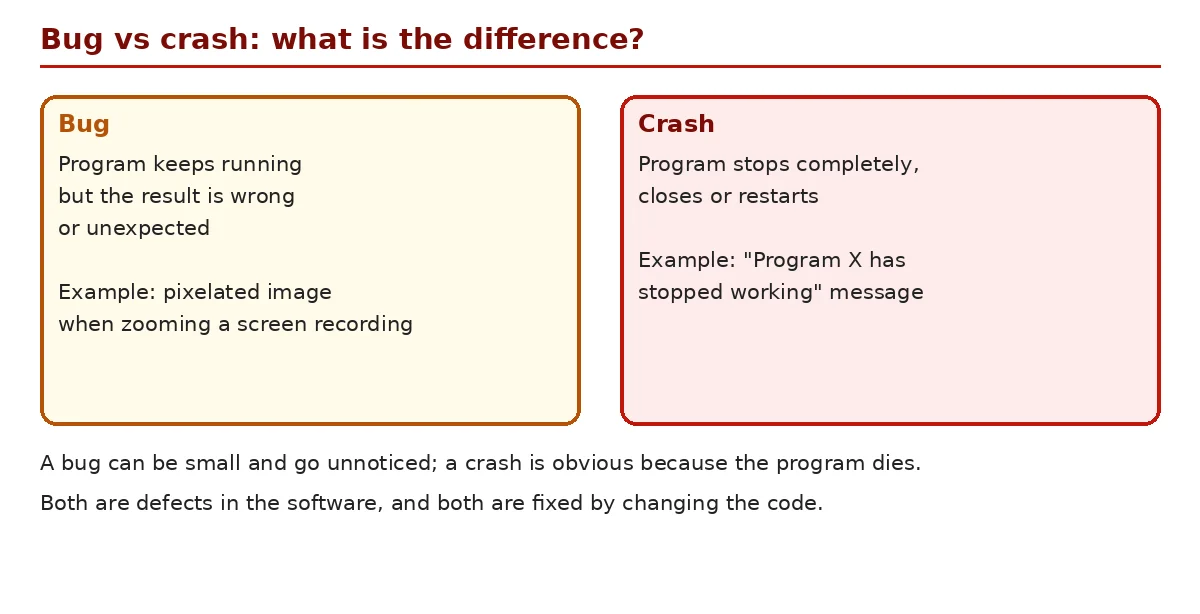
- A bug is an error, flaw or fault in a computer program or system that causes it to produce an incorrect or unexpected result, or to behave in unintended ways.
- Real example from the video: recording the screen with QuickTime on an older macOS (High Sierra), zooming in and out gave a pixelated image. The program kept working, but the result was not what was expected. That is a bug.
- A bug is not a real insect in an electronic board, even if funny pictures show it that way (see the history of the word below).
Step 10Report the bug so it can be fixed
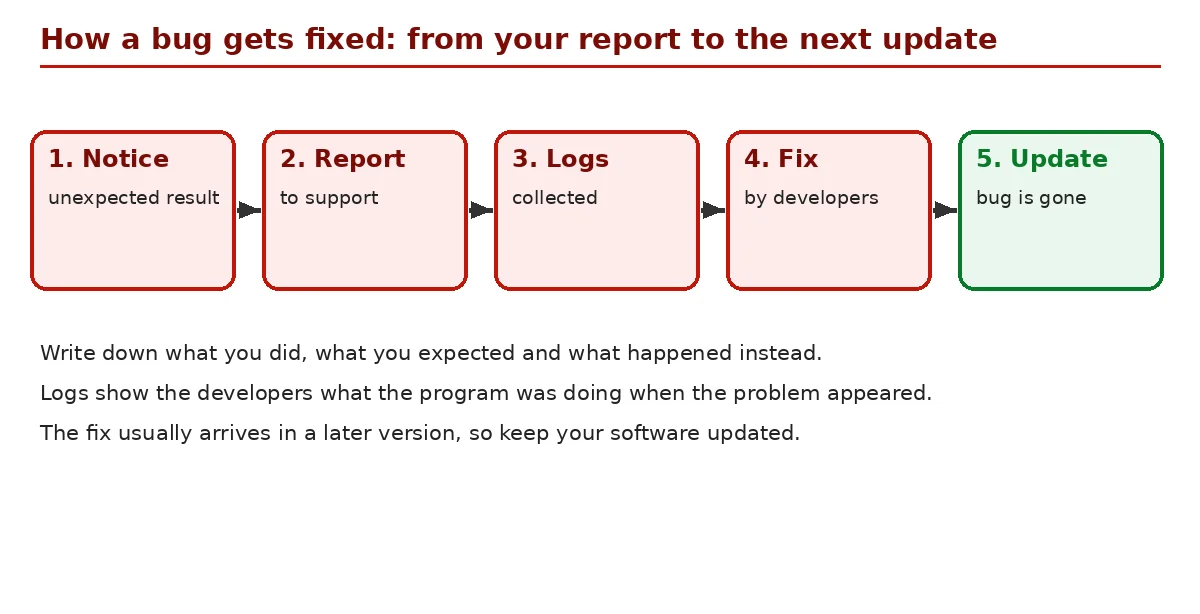
- What I did with the QuickTime bug: I called support and explained the problem.
- They collected some logs and sent them to the developers to try to fix it.
- In the next operating system release the problem was fixed, so other people do not have the same issue. You will see this process in many other programs.
- Tip: when you report a bug, say what you did, what you expected and what happened instead.
Step 11Recognize a crash
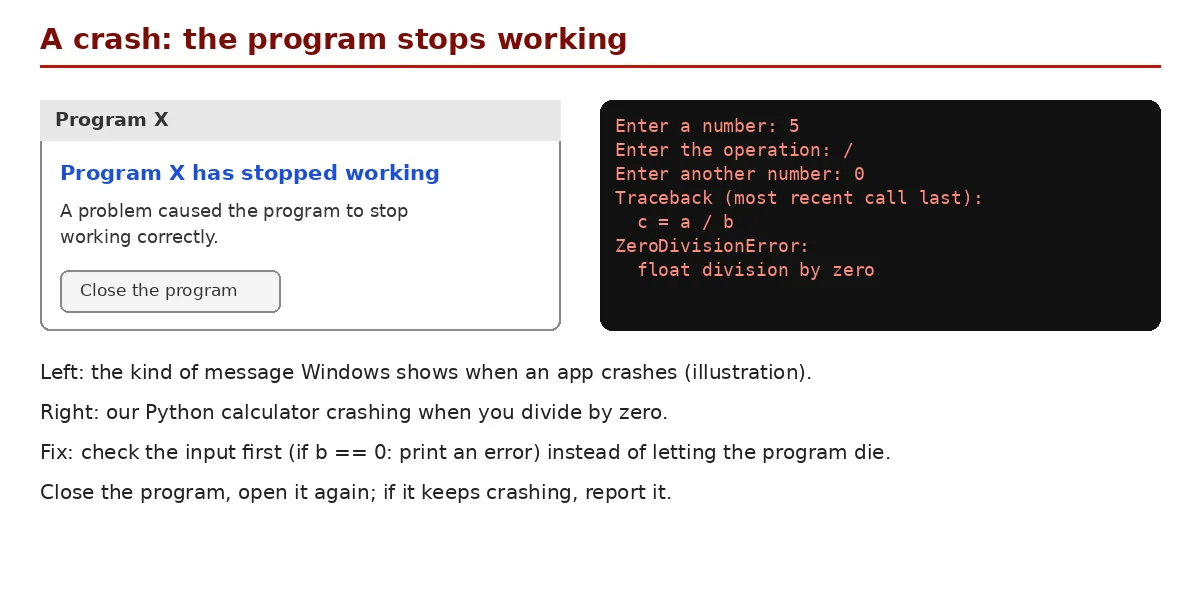
- When a program crashes, it stops working completely: it exits, restarts by itself, or you may even have to turn the computer off and on because there was a big problem.
- On Windows you may see a message like "Program X has stopped working". You close it, open it again, and it should start running again.
- Our calculator crashes too: divide by 0 and Python stops with
ZeroDivisionError. Checking the input first (if b is 0, show a message) prevents it. - If it is something minor and the program keeps running, it might be a bug instead.
Step 12Expect errors, and find them early
- Errors are normal when you code. Nobody is perfect.
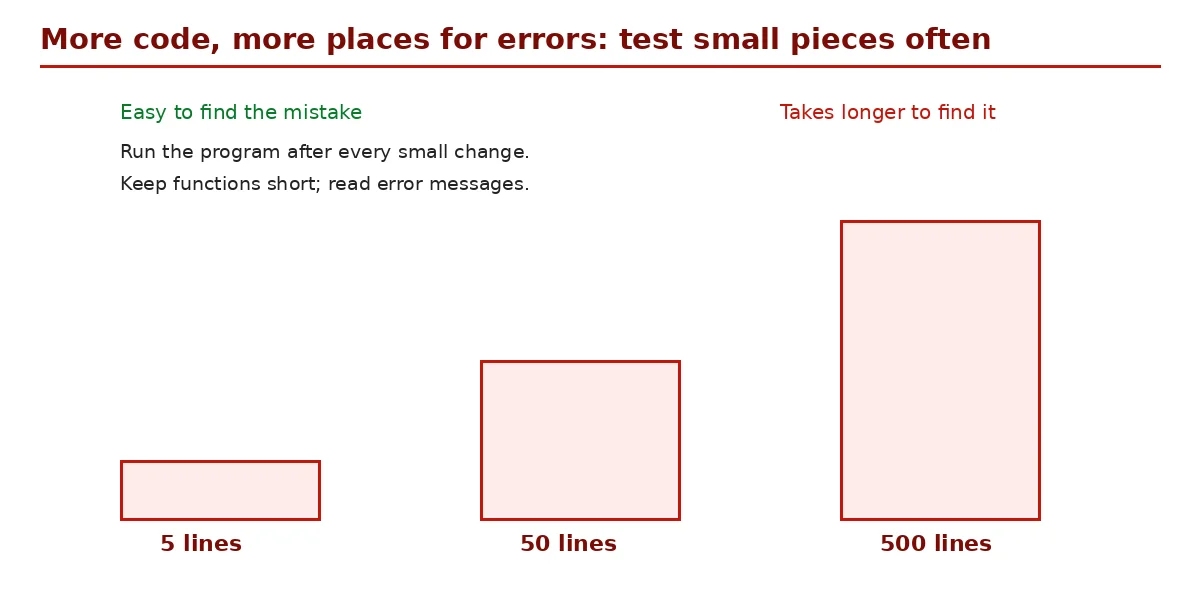
- In the beginning you will find a few small errors because your programs have only a few lines.
- As you keep coding, the software gets bigger and bigger, and it becomes more difficult, or takes longer, to find an error than in a program of five or six lines.
- That is why programmers run their code after every small change. Next lesson: what a programming language is.
Bug vs crash vs error: comparison table
| Bug | Crash | Error message (exception) | |
|---|---|---|---|
| What you see | Wrong or unexpected result | Program stops, closes or restarts | Program shows what went wrong (line and type) |
| Program keeps running? | Usually yes | No | Often stops, unless the code handles it |
| Example | Pixelated zoom in a screen recording | "Program X has stopped working" | NameError, ZeroDivisionError in Python |
| Who notices | Sometimes nobody, for a long time | Everybody, immediately | The programmer, while testing |
| How it is fixed | Find the faulty logic and change the code | Find the cause (bad input, missing file, memory) and handle it | Read the message, fix the line |
All three come from the same place: something in the code (or its input) does not match what the programmer intended.
Where does the word "bug" come from?
Engineers called small flaws in machines bugs long before computers; the Smithsonian notes that Thomas Edison talked about bugs in electrical circuits in the 1870s. The famous story is from 1947: engineers working on the Harvard Mark II computer found a moth stuck in one of its relays, taped it into the logbook and wrote "first actual case of bug being found." Mathematician and programmer Grace Hopper was on that team, and they helped popularize the words bug and debug. The logbook is in the Smithsonian's National Museum of American History.
Today, a bug almost never means an insect: it is a mistake in the software's logic.
Common causes of bugs for beginners
- Wrong order of steps: using a value before it is set, like the calculator example.
- Wrong operation: using + when you meant *, or comparing the wrong variables.
- Unexpected input: the user types a letter where the program expects a number, or 0 for a division.
- Typing mistakes: a variable called
totalin one line andTotalin another (Python treats them as different names). - Text vs numbers: in Python,
input()returns text, so "1" + "2" gives "12" unless you convert it withint()orfloat(). - Saving code in the wrong format: code must be plain text, see how to write source code in a plain text editor.
What to do when your program crashes or has a bug
| Situation | First thing to try |
|---|---|
| Your own program shows a Traceback | Read the last line (error type) and the line number, fix that line, run again |
| Your program gives a wrong result | Print the variables step by step (print(a, b, c)) to see where the value goes wrong |
| An app you use crashes once | Close it and open it again |
| An app crashes every time | Update it; if it continues, report it with what you did before the crash |
| An app gives a wrong result (bug) | Report it to support; they may collect logs for the developers |
| The whole computer freezes | Save what you can, restart the computer, then update the system and the app |
Tips to write code with fewer bugs
- Plan first: write the steps as a list or a flowchart before you code.
- Small steps: write a few lines, run them, then continue.
- Use clear variable names (
first_numberinstead ofx) once your programs grow. - Check user input before using it (empty, not a number, zero for a division).
- Read error messages carefully; they usually tell you the line and the cause.
- Learn how your language runs code: see the difference between a compiler and an interpreter.
- Keep your tools updated: many bugs you hit in editors and systems are already fixed in newer versions.
Frequently asked questions
What is programming in simple words?
Programming is converting ideas into instructions that a computer can understand and execute, written in a programming language and run in a specific order.
Why is the order of code important?
The computer runs instructions one after another. If a step uses something that was not created yet, or the steps are swapped, the program gives an error or a wrong result.
What is a bug in programming?
A bug is an error, flaw or fault in a program that makes it produce an incorrect or unexpected result or behave in unintended ways.
What is a crash in programming?
A crash is when a program stops working completely: it closes, restarts by itself, or freezes so you have to restart the computer.
What is the difference between a bug and a crash?
With a bug the program keeps running but does the wrong thing. With a crash the program stops. A bug can also cause a crash.
Why is it called a bug?
Engineers called machine flaws bugs since the 1800s. In 1947 the Harvard Mark II team found a real moth in a relay and taped it in their logbook as the first actual case of bug being found.
Is it normal to get errors when learning to code?
Yes. Everyone makes mistakes. Small programs have few, easy errors; bigger programs take longer to debug, so test small pieces often.
What is a variable in programming?
A variable is a name that stores a value, like a = 1 in the calculator example, so the program can use it in later steps.
Watch the video


Comments
Comments appear after Gabriel reviews them.
Loading comments…