

Blog
What is the best camera for YouTube?
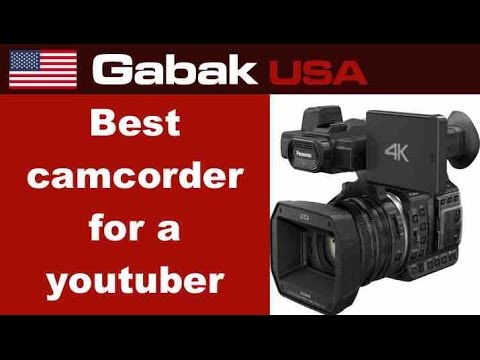
Short answer: before comparing a $150 and a $500 camera, check the features that actually matter for YouTube: manual focus, manual white balance, an external microphone input and a headphone output. I compare a Panasonic 1080p (X900M) with a Panasonic 4K model, both around $800-900 when new.
If you are searching for the best camera for YouTube, what to look for in a YouTube camera, or is a $500 camera really better than a $150 one, the honest answer from this video is that the label and the price matter less than four practical features: manual focus, manual white balance, an external microphone input and a headphone output. A camera without them can look fine on a spec sheet and still make filming frustrating.
The advice comes from more than three years of making YouTube videos, plus the cameras bought over about five years. It is not a list of the newest models: the video compares two Panasonic camcorders (a 1080p X900M and a 4K model) because they make the differences easy to see, and it says the same features exist on most brands. Use this article as a buying checklist before you spend money on any camera for filming tutorials, reviews or talking-head videos.
In this article
- My experience
- Manual focus
- Manual white balance
- Microphone input
- Headphone output
- $150 vs $500 camera
- 1080p vs 4K Panasonic
- Little details
- External mic options
- Why monitor the audio
- Checklist before you buy
- Quick checklist: what to look for in a YouTube camera
- $150 camera vs $500 camera: where the money goes
- Panasonic 1080p vs 4K in the video
- External microphone options
- Why sound matters more than the picture
- Mistakes to avoid when buying a YouTube camera
- Frequently asked questions
- Watch the video
My experience
I have been making YouTube videos for over three years, and my Spanish channel has over 80,000 subscribers. These are the lessons from the cameras I bought in the past five years.
Manual focus
Autofocus can go out of focus for a few seconds when you film yourself, and it struggles with shiny or silver surfaces, like the computers and phones I repair. Manual focus solves that.
Autofocus is convenient until you film yourself. Two situations from the video show why manual focus is worth having:
- You are the subject. When the camera is on you and the light changes, autofocus can drift out of focus for a few seconds and then snap back. That pulsing is distracting and ruins takes.
- The subject is shiny. When you film computers, phones and glossy or silver screens, the camera struggles to lock on. Being able to set focus by hand fixes this.
When you compare cameras, check that you can switch focus to manual and that the ring or control is easy to reach.
Manual white balance
Being able to choose a cooler or warmer color temperature manually lets you match the look you want.
White balance controls how warm (yellowish) or cool (bluish) the colors look. The video explains it like choosing between a warm and a cool light. If the camera lets you set it manually, you can match the look you want and keep the color the same from one clip to the next, instead of letting the camera change it every time the light shifts.
Microphone input
The built-in mic is omnidirectional: it picks up sound from everywhere, so your voice is not loud and clear and you hear dogs and noise. Choose a camera with a mic input. I use a Sennheiser shotgun mic, which ignores sound from the sides. On a budget, a lavalier mic for a dollar or two on eBay works; you are just tied to the cable.
The built-in microphone is omnidirectional: it picks up sound from all around. The result is a voice that is not loud and clear, plus background noise such as a barking dog. The fix is a camera with a microphone input, so you can use a better mic. The video shows a Sennheiser shotgun microphone, which picks up what it points at and ignores the sides. On a tight budget, a cheap lavalier microphone works too, and you can buy an extension cable if you need extra length.
Headphone output
A headphone output lets you hear if the sound is good while recording. A cheap mic can ruin a video, and you only find out later if you can't monitor it.
Recording without monitoring is a gamble. A cheap mic can pick up interference or noise, and if you cannot listen while you record, you only learn about it in the edit. A headphone output lets you hear exactly what the camera is recording. It is a small feature that saves whole videos.
$150 vs $500 camera
The price difference is in these features. A cheaper camera may look fine on paper, but when you start making videos you find out it can't do what you thought: it loses focus, you can't connect a good mic or you can't hear what you are recording.
1080p vs 4K Panasonic
I compare two Panasonic camcorders: the 1080p X900M and a 4K model. Both were about $800 to $900 new, and each new Panasonic of this type comes out around the same price. What matters most are the features I listed, which are found in most cameras and brands.
Little details
On the 4K Panasonic, the mic and headphone ports are under a cover that does not close all the way when cables are plugged in, so I like the other model better there. A shoe adapter on top lets you mount more accessories.
External mic options
A shotgun mic like my Sennheiser picks up sound from where it points and ignores the sides, so it is great when you don't want cables. A lavalier is the cheapest option: clip it on, plug it in and record, with an extension cable if you need more length. Wireless mics free you from cables completely.
Why monitor the audio
A cheap $10 or $20 mic can sound bad, and a dog barking or background noise can ruin a take. With headphones connected to the camera you hear the problem while recording, not after you edit.
Checklist before you buy
1. Manual focus. 2. Manual white balance. 3. External mic input. 4. Headphone output. 5. Then compare price and resolution.
Quick checklist: what to look for in a YouTube camera
| Feature | Why it matters | What can go wrong without it |
|---|---|---|
| Manual focus | Keeps you or the product sharp | Focus drifts or hunts, especially on shiny screens |
| Manual white balance | Consistent color across clips | Color shifts when the light changes |
| External mic input | Lets you use a shotgun, lavalier or wireless mic | Thin, noisy sound from the built-in mic |
| Headphone output | Lets you hear the audio as you record | Bad audio discovered only in editing |
| Accessory shoe | Lets you mount a mic or light | No easy place for add-ons |
| Port cover design | Cables stay connected | A cover that will not close with cables plugged in |
If a camera ticks the first four boxes, it is a serious candidate, whatever its brand.
$150 camera vs $500 camera: where the money goes
The question in the video is what the real difference is between a $150 camera and a $500 one. The answer is mostly not picture quality on paper. It is features. A cheaper camera can look similar in a product listing, but once you start making videos you discover that it loses focus, you cannot plug in a good microphone, or you cannot hear what you are recording. A more expensive camera usually earns its price by including those controls.
That said, a higher price does not guarantee the features. Always check the actual list of inputs and manual controls before you buy, and read the manual online if the store page is unclear.
Panasonic 1080p vs 4K in the video
The video compares a Panasonic 1080p camcorder (the X900M) with a 4K Panasonic model. When new, both cost roughly $800 to $900, and the video notes that each new Panasonic of this type tends to come out at around the same price. The comparison is useful because both cameras have the key features, so the difference comes down to details.
One detail: on the 4K Panasonic, the microphone and headphone ports sit under a cover that does not close all the way when cables are plugged in, so the other model is preferred there. The cameras also have an accessory shoe, which lets you add more equipment on top. Remember that these are the models from the video, and the prices were for new units at the time, so look at current prices and availability before you buy.
Do you need 4K? The video's point is that features come first. A 4K sensor does not help if the sound is bad or the focus keeps hunting. Choose 4K when you want more flexibility in editing or a sharper image, but do not choose it instead of manual focus and a mic input.
External microphone options
| Option | How it works | Best for | Drawback |
|---|---|---|---|
| Shotgun mic | Picks up sound from where it points and ignores the sides | Talking to the camera without clip-on cables | Costs more |
| Lavalier mic | Clips on your clothes and plugs into the camera | Tight budgets, very close voice | You are tied to the cable unless you use an extension |
| Wireless mic | A transmitter and receiver, no cable | Moving around freely | More expensive, needs batteries |
The video mentions that a basic lavalier can cost only a dollar or two online, which is a cheap way to improve sound a lot. A cheap mic can still pick up interference, which is why the headphone output matters. If you are interested in wireless options, see how to connect a wireless microphone to a camcorder and how to connect a wireless mic to an iPhone or Android phone.
Why sound matters more than the picture
Viewers forgive a slightly soft picture much more easily than bad audio. The video points out the "crappy videos" where you cannot hear the person well because of a dog barking or noise in the room. Better sound usually comes from three things: a microphone close to the speaker, a pickup pattern that ignores the sides, and monitoring through headphones. If you only upgrade one thing after the camera, make it the microphone.
Mistakes to avoid when buying a YouTube camera
- Buying on resolution alone and ignoring the inputs and manual controls.
- Trusting the built-in mic for anything you plan to publish.
- Skipping the headphone jack because "the sound looked fine".
- Choosing a camera whose cover or port layout makes cables awkward.
- Forgetting accessories such as a mic, an extension cable, batteries and a card.
- Never doing a test recording before the first real video. Record 30 seconds, listen with headphones and watch it on a computer screen.
For help with the rest of a streaming or video setup, you can also read the Teradek Vidiu Pro demo and review.
Frequently asked questions
Is 4K necessary for YouTube?
Features like manual focus and a mic input matter more for good videos.
Why does a camera need a mic input?
The built-in mic picks up sound from everywhere; an external mic like a shotgun or lavalier sounds much clearer.
Why manual focus?
Autofocus can hunt when you film yourself or shiny objects; manual focus keeps the shot sharp.
Is a 4K camera necessary for YouTube?
Not necessarily. The video compares a 1080p and a 4K Panasonic that cost about the same when new, and the main message is that manual focus, a microphone input and a headphone output matter more than resolution.
Why does a YouTube camera need a microphone input?
The built-in microphone is omnidirectional and picks up sound from everywhere, so your voice is weak and background noise is loud. An input lets you plug in a shotgun, lavalier or wireless microphone for clearer sound.
Why is manual focus important when filming yourself?
Autofocus can go out of focus for a few seconds when the light changes, and it can struggle with shiny or silver surfaces such as laptop and phone screens. Manual focus avoids both problems.
What is manual white balance?
It lets you choose a warmer or cooler color temperature yourself, so the color of your videos stays consistent and matches the look you want.
Do I need a headphone jack on my camera?
It is strongly recommended. With headphones plugged in, you can hear interference or poor audio while you record instead of discovering it later.
What is the cheapest way to improve camera audio?
Use an external microphone. The video notes that a simple lavalier mic can cost only a dollar or two, with an extension cable if you need more length.
Watch the video



Comments
Comments appear after Gabriel reviews them.
Loading comments…